
In Iptim, the stand register includes a column called "past thinnings". The information in those cells, together with other considerations, will allow Iptim to take decisions related to thinning-simulations both before and after the beginning of a plan.
The key to understand "past thinnings"
There are two main considerations to take. First, if a stand has inventory measurements, Iptim assumes that the information of that stand is up to date with respect to what we call the update stage (the time from the inventory to the present day, or the beginning of the plan). If a stand does not have inventory measurements, Iptim assumes that the information is not up to date.
Second, the "past thinnings" cells can be set to:
- blank, telling Iptim that there is no thinning information to consider.
- "na", telling Iptim that thinnings were not accounted for during the update stage.
- a number, telling Iptim the number of thinnings that were conducted during the update stage.
Example
A plan has been created with the following characteristics:
- 7 stands (4 of them with inventory data and 3 without inventory data).
- The inventory date is 01/01/2016.
- The regime of the plan specifies one thinning in 01/01/2017 for all the stands (i.e. at age 6).
- The plan's initial date is 01/01/2018.
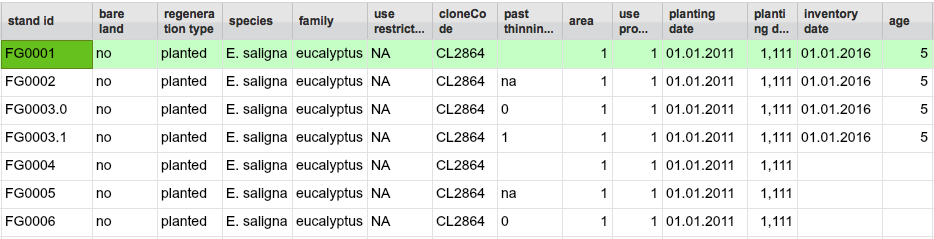
¿Will thinnings be conducted in those stands?
- FG0001: NO, Iptim will not thin the stand either during or after the update stage.
- Why? The combination of inventory results (telling Iptim that the inventory information is up to date) and a blank cell (telling Iptim that there is no additional information to consider).
- FG0002: YES, Iptim will thin the stand during the update stage (in 2017)
- Why? The combination of inventory results (telling Iptim that the inventory information is up to date) and "na" (telling Iptim that thinnings were not accounted for during the update stage).
- FG0003.0: NO thinnings in the update stage, BUT YES right-after the update stage.
- Why?: The combination of inventory results (telling Iptim that the inventory information is up to date) and "0" (telling Iptim that 0 thinnings were conducted during the update stage).
- FG0003.1: NO, Iptim will not thin the stand either during or after the update stage.
- Why? The combination of inventory results (telling Iptim that the inventory information is up to date) and "1" (telling Iptim that the stand has already been thinned once).
- Note: Notice that the difference in having "0" or "1" relates to what occurs after the update stage.
- FG0004: YES, Iptim will thin the stand during the update stage (in 2017)
- Why? The combination of no inventory results (telling Iptim that the inventory information is not up to date) and blank (telling Iptim that there is no additional information to consider).
- FG0005: YES, it will thin the stand during the update stage (in 2017)
- Why? The combination of no inventory results (telling Iptim that the inventory information is not up to date) and "na" (telling that thinnings were not accounted for during the update stage).
- FG0006: NO thinnings in the update stage, BUT YES right-after the update stage.
- Why? The combination of no inventory results (telling Iptim that the inventory information is not up to date) and "0" (telling Iptim that 0 thinnings were conducted during the update stage).
Comments
0 comments
Please sign in to leave a comment.